

Steven Smith is a Texas native and the current Owen student body president. He recently sat down with OwenBloggers to discuss what sets Owen apart, and what the school can expect in the coming years.
-
Polls
 Loading ...
Steven Smith is a Texas native and the current Owen student body president. He recently sat down with OwenBloggers to discuss what sets Owen apart, and what the school can expect in the coming years.
It’s officially recruiting season at Owen, not just for the second years but also for first years, and with that comes the necessary networking with alumni. There are many tools available to business student for networking, but I want to tell you a little bit more about how you can use LinkedIn to find alumni that might be able to help you in your job search.
Starting at on your LinkedIn home page, hover over ‘Contacts’ then select a school, for instance Vanderbilt. This will take you to the LinkedIn Alumni Tool which should look something like this:
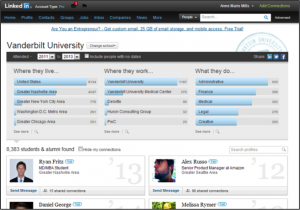
This starting point will show you people in your network that were with you at that school. However you can change this to look for people that were there outside of that timeframe by editing the dates right under the university name. I would recommend choosing something like 1900 and clicking on the ‘Include people with no dates’ to ensure that you get the full set of alumni.
You can also change the school to be more specific, for instance by clicking on the ‘Change School’ button you can type the name of the business program (‘Owen Graduate School of Management’) and narrow your focus that way.
I know I got all excited last week about endorsements, but here’s another great new feature that was being worked on over the summer.
You can now follow some of the top thought leaders in industry and the world!

Look for this box on your home page or LinkedIn Today
Personally, I’m following Jeff Weiner, Richard Branson, Dan Shapero, Barack Obama, Arianna Huffington, Deepak Chopra MD, Marcus Samuelsson, Reid Hoffman and many others. There are over 50 individuals from professors to CEOs to other influencers from around the world that you can follow based on your personal interests and desires. Each person is now developing original content for LinkedIn as a way to continue to make the site your go-to place for business information that will help you do your job better and more efficiently. Some of their recent postings have included ‘Dream. Fit. Passion’ by Jeff Wiener (CEO of LinkedIn), ‘Five top tips to starting a successful business’ by Richard Branson, ‘Why Healthcare Loves the iPad’ by Mary Pat Whaley, and ‘The “euro crisis” and US construction’ by Ken Simonson to name a few.
I hope that you will find these articles helpful and interesting!!
I took Corporate Valuation Mod 1 this year. This offering is dubbed “Corp Val for Poets” because anyone with an interest in Finance would have taken it first year, leaving those of us studying marketing, HOP, and Operations to take it this year. Taking Corp Val was a choice that caused many of my fellow marketing concentrators to ask “Why did you do that??” There’s definitely no denying that it’s outside of my comfort zone. However, I think that’s part of what we’re all here for – to challenge ourselves and to do things that may not be easy or even particularly enjoyable.
I told my two teammates that I was going to write this blog, and one turned to the first-year next to us and stated “Don’t listen to her.” The other advised me, “Wait ‘til we get our final exam grades.” The class was not easy. It’s my second year, I have an offer, and I could have been coasting along. But instead I spent 10 hours every weekend pouring over financials and trying desperately to figure out how to do valuation by multiples or risk neutral pricing or something else that I’d never heard of.
Career conferences are a major opportunity in business school to network with MBA candidates from other schools, gain exposure to a number of companies who recruit MBA students, and to potentially interview for positions with these companies. The National Black MBA Association conference was held last week in Indianapolis, IN, and several students from Owen attended. Here are two of their stories:
———————————————————————————————————–
The travel arrangements are made, I’ve let all my professors know why I won’t be in class on Thursday, and I’ve printed off multiples of 4 different versions of my resume: I’m ready for “National Black”, one of the premier MBA conferences in the country, and a major opportunity to land my post-Owen job.
Walking into the conference on Thursday morning, the nervous anticipation was visible on the faces of students who had flown in from across the country. Prospective employees leaned on one another for advice and support.
“What have you heard about the Unilever interview? Is there a case?”
“I can’t believe I told the interviewer about my high school band competition. Do I even stand a chance at second round?”
Loading ...